How to Format SQL Queries So They Are Easy to Read (Free Tool)
Short answer
To format a SQL query, put each main clause (SELECT, FROM, WHERE, GROUP BY, ORDER BY) on its own line, list one column per line, indent the AND and OR conditions, and write keywords in capitals. You can do it by hand, or paste the query into our free SQL Formatter and press Format. It runs in your browser and only changes spacing and keyword case, never what the query does.
SQL has a habit of ending up on one very long line. Apps build queries in code and log them that way, reporting tools export them that way, and when you write one in a hurry it grows sideways until you have to scroll to see the end. The database doesn't care: to it, spaces and line breaks are just separators. People do care. A query you can't read is a query where a missing join condition or a wrong filter hides in plain sight.
Formatting fixes that. It doesn't change the result of the query at all. It just lays the query out so its shape is obvious: what you select, where it comes from, how tables are joined, which rows are filtered and how the result is sorted.
How to format a SQL query in three steps
- Open the SQL Formatter and paste your query into the box. You can paste several statements at once if they end with semicolons.
- Pick your style: an indent of 2 spaces, 4 spaces or a tab, and whether keywords should be changed to UPPERCASE or left as you typed them.
- Press Format SQL and copy the result. Changing the indent or the uppercase option updates the output straight away.
Everything happens on your own device, so table names, customer data or anything else inside the query isn't sent to our server. That matters if you copied the query from a work system.
Before and after
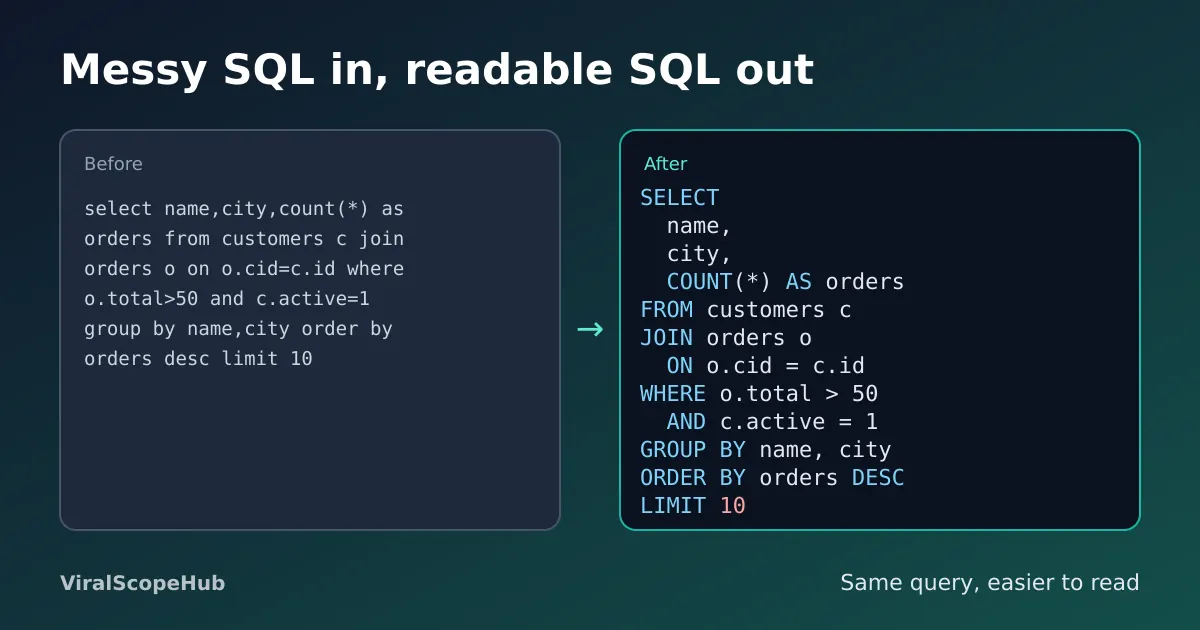
Here is a typical one-liner:
select name,city,count(*) as orders from customers c join orders o on o.cid=c.id where o.total>50 and c.active=1 group by name,city order by orders desc limit 10And here is what the formatter gives back:
SELECT
  name,
  city,
  COUNT(*) AS orders
FROM customers c
JOIN orders o
  ON o.cid = c.id
WHERE o.total > 50
  AND c.active = 1
GROUP BY name, city
ORDER BY orders DESC
LIMIT 10
Same query, same result. But now you can see in one glance that there are three output columns, one join, two filters and a top-10 limit. If someone asks "why are inactive customers missing?", the answer is right there on its own line.
The formatting rules that matter most
Style guides differ in the details, but almost all of them agree on a few basics. These are also the rules our formatter follows:
- One main clause per line. SELECT, FROM, WHERE, GROUP BY, HAVING, ORDER BY and LIMIT each start a new line, so you can read the query top to bottom like a recipe.
- One column per line in SELECT. It makes long column lists easy to scan, and when you add or remove a column later, the change is a single clean line.
- Every JOIN on its own line, with its ON condition indented under it. A join without a proper ON condition can multiply rows, so you want it to be easy to spot.
- AND and OR indented under WHERE and ON. Each condition gets its own line, which makes it much easier to see what is really being filtered.
- Subqueries indented one level deeper, with the closing bracket on its own line, so you can tell where the inner query ends.
- Keywords in capitals, table and column names as they are. This is a convention rather than a rule (SQL keywords aren't case-sensitive), but it separates the language from your data at a glance.
What the formatter never touches
A good formatter only moves whitespace and changes the case of SQL keywords. Text inside single quotes, such as 'Pune' or '2026-01-01', stays exactly as written, because changing it would change your data. Quoted names like "Order Details" or [Order Details] are left alone too, and so are comments. That is also why one formatter works for MySQL, PostgreSQL, SQLite, SQL Server and most other databases: it isn't rewriting the query in any dialect, just laying it out.
When to minify instead
Sometimes you want the opposite: the whole query on one line, for example inside a config file, a spreadsheet cell or a string in code. The Minify button does that. It removes comments and line breaks and squeezes the query into a single line. Keep the formatted copy for reading and reviewing, and use the minified one only where a single line is required. If the query lives in a JSON settings file, our JSON formatter helps you check the file around it, and our code beautifier does the same job for HTML, CSS and JavaScript.
Small habits that make SQL easier to read
- Use short, clear table aliases such as
cfor customers andofor orders, and use them on every column when you join tables, so nobody has to guess which tablenamecomes from. - Name your calculated columns with AS, like
COUNT(*) AS orders. The result is easier to read and easier to sort by. - Add a short comment above anything surprising, starting with
--. Future you will be grateful. - Format before you share. Pasting a tidy query into a chat, a ticket or a code review saves everyone a few minutes.
If you work with exported data, our JSON to CSV converter can turn API results into a spreadsheet you can check against your query. And if you are studying SQL for a course or a job test, our study hub and exam guides have more free help, while the full tools list has everything else we offer.
VSH take: A lot of people think formatting is just about looking neat. In our experience it is really about catching mistakes. Most SQL bugs we have seen were not clever: a forgotten join condition, an OR that needed brackets, a filter on the wrong table. All of them are much easier to spot when each part of the query sits on its own line. Formatting takes one click, so there is no reason to read a query any other way.
ViralScopeHub is independent and not affiliated with Oracle, Microsoft, the PostgreSQL project, SQLite or any database maker mentioned here.
Frequently asked questions
How do I format a SQL query online?
Paste the query into a free SQL formatter such as ours, choose an indent and whether keywords should be uppercase, and press Format SQL. Main clauses move to new lines and conditions are indented.
Does formatting change what my query does?
No. Formatting only changes spaces, line breaks and the case of SQL keywords. Text in quotes, names and comments stay the same, so the query returns exactly the same result.
Should SQL keywords be uppercase?
SQL keywords are not case-sensitive, so it is a style choice. Many teams write them in capitals because it separates SQL words from table and column names. Our formatter can do either.
Does the formatter work with MySQL, PostgreSQL and SQL Server?
Yes. Because it only rearranges whitespace and keyword case, it works with MySQL, PostgreSQL, SQLite, SQL Server and most other databases.
What does minify SQL mean?
Minifying removes comments and line breaks so the whole query fits on one line. It is useful inside config files or code strings. Keep a formatted copy for reading.
Is my SQL uploaded to your server?
No. The SQL Formatter runs in your browser, so the queries you paste stay on your device.



