What Is Markdown? A Beginner's Guide With a Cheat Sheet
Short answer
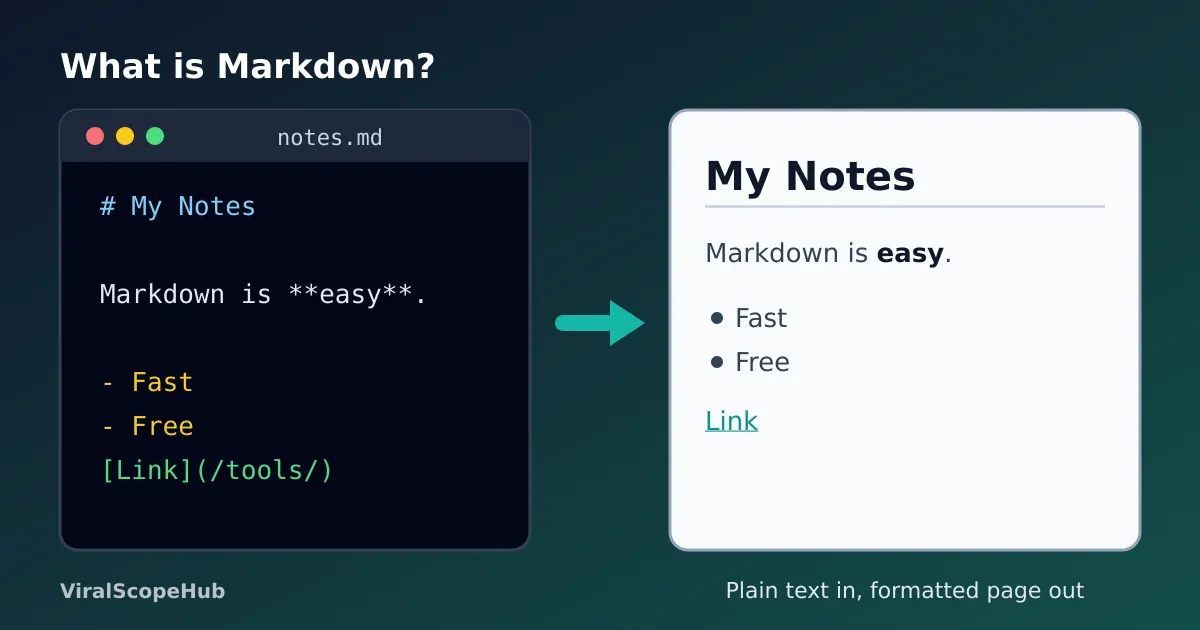
Markdown is a simple way to format text using ordinary keyboard symbols: a hash sign makes a heading, two asterisks make bold text and a dash starts a list. You write plain text that stays easy to read, and an app or website turns it into a neatly formatted page (HTML). It is used in README files, notes apps, chat apps, forums and blogs. Try it live in our free Markdown to HTML Converter.
If you have ever typed two asterisks around a word in a chat app and watched it turn bold, you have already used Markdown, or something very close to it. Markdown was created in 2004 by John Gruber, with help from Aaron Swartz, as a way to write for the web without typing HTML tags. The goal was simple: a Markdown file should look clean and readable even before it is converted.
Today it is everywhere. Developers use it for README files and documentation, students use it in note apps, and many blogging tools, forums and chat apps accept it. Once you know about ten symbols, you can format almost anything.
How Markdown works
You write in a plain text file, usually ending in .md. A program called a Markdown parser reads the symbols and turns them into HTML, the language web pages are written in. For example, # My trip becomes a big heading, and **important** becomes important. You never have to open or close tags yourself.
The nice part is that the raw text is still pleasant to read. Someone opening your file in a basic text editor can follow it easily, which is not true of a page full of HTML tags.
Markdown cheat sheet
These are the pieces you will use most. All of them work in our Markdown to HTML Converter, so you can paste any line and see the result instantly.
| You want | You type | Notes |
|---|---|---|
| Big heading | # Heading | One to six hash signs, then a space. ## is a smaller heading. |
| Bold | **bold** | Two underscores also work: __bold__. |
| Italic | *italic* | Or a single underscore on each side. |
| Strikethrough | ~~old price~~ | Part of the GitHub-style extensions. |
| Bullet list | - item | A dash, asterisk or plus sign, then a space. |
| Numbered list | 1. step | Indent a line to make a nested list. |
| Link | [text](https://example.com) | The words go in square brackets, the address in round ones. |
| Image |  | Same as a link with an exclamation mark in front. |
| Quote | > quoted text | Like quoting in an old-style email. |
| Inline code | a backtick (`) on each side | Shows the text in a code font. |
| Code block | three backticks on the line before and after | Add a language name after the first three, like js. |
| Horizontal line | --- | Three dashes on their own line. |
| Task list | - [x] done | - [ ] makes an empty box. |
Tables in Markdown
Tables are not part of the original 2004 Markdown, but GitHub Flavored Markdown added them and most tools now support them. You draw the columns with vertical bars and put a row of dashes under the header:
| Fruit  | Price |
|--------|------:|
| Mango  |  1.20 |
| Banana |  0.25 |
The colon controls alignment. A colon on the right of the dashes, as in the Price column above, aligns that column to the right, which is handy for numbers. A colon on both sides centres it. The bars do not need to line up perfectly; the converter only cares that each row has them.
Paragraphs and line breaks
This is the part that confuses most beginners. Pressing Enter once does not start a new paragraph in standard Markdown. The two lines are joined into one. To start a new paragraph, leave a completely blank line between them. If you want a line break without a new paragraph, for example in an address or a poem, end the line with two spaces before pressing Enter. Some apps, including many chat tools, treat every Enter as a line break, which is why the same text can look different in different places.
Why there are different "flavors"
The original Markdown description left some details open, so different apps filled the gaps in slightly different ways. In 2014 a group of developers published CommonMark, a detailed specification with hundreds of examples so parsers behave the same way. GitHub Flavored Markdown builds on CommonMark and adds tables, strikethrough, task lists and automatic links. If something works on one site but not another, a flavor difference is usually the reason. Sticking to the basics in the cheat sheet above keeps your text working almost everywhere.
Common mistakes and quick fixes
- No space after the hash.
#Headingmay stay as plain text. Write# Heading. - A list right after a paragraph. Some parsers need a blank line before the first list item, so add one if your list does not appear.
- Stray asterisks. A price like 5*3*2 can accidentally turn into italics. Put maths and code inside backticks so the symbols are shown as they are.
- Spaces in link addresses. A space inside the round brackets breaks the link. Replace spaces in the address with
%20or use a cleaner address. - Forgetting alt text. The words in the square brackets of an image are read aloud by screen readers, so describe what the picture shows.
Where you will see Markdown
README files on code-hosting sites, documentation sites, static site generators, note apps such as Obsidian and Joplin, Reddit posts, Discord messages and many AI chat assistants all use Markdown or a close variant. Writers like it because it keeps their hands on the keyboard, and the same text can be turned into a web page, a PDF or an e-book.
VSH take: Markdown is one of those small skills that pays off for years. Ten minutes with the cheat sheet is enough for most people, and the habits it teaches, such as clear headings and short lists, make any writing easier to scan, even outside Markdown.
Try it in four steps
- Open our free Markdown to HTML Converter; it runs in your browser, so your text is not uploaded.
- Type a heading, a short list and a link, and watch the live preview update.
- Switch to the HTML tab to see the code it creates, then copy it or download a web page. Tidy other HTML or CSS with the Code Beautifier.
- Check the length of your finished text with the Word Counter, and fix headline capitals with the Case Converter.
Planning a trip or studying for an exam? Our flight deals hub, exam guides and study tools are free too.
This guide is general information for students, writers and website owners. ViralScopeHub is an independent site and is not affiliated with GitHub, the CommonMark project, John Gruber or any app mentioned here.
Frequently asked questions
What is Markdown used for?
Formatting text with simple symbols so it can be turned into a web page. It is used for README files, documentation, notes, blog posts, forum posts and chat messages.
Is Markdown a programming language?
No. It is a lightweight markup language: a set of formatting rules for text. It has no logic, loops or variables, so anyone can learn it in a few minutes.
What file extension does Markdown use?
Usually .md, sometimes .markdown. Both are ordinary text files you can open in any text editor.
How do I make a new line in Markdown?
Leave a blank line to start a new paragraph. For a line break inside a paragraph, end the line with two spaces before pressing Enter.
What is the difference between Markdown and HTML?
HTML uses tags like strong and h1 that browsers read directly. Markdown uses short symbols that a converter turns into those HTML tags, so it is quicker to type and easier to read.
Can I convert Markdown to HTML for free?
Yes. Paste your text into our free Markdown to HTML Converter to see a live preview, then copy the HTML or download it as a web page.



