CSS Box Shadow Explained: Syntax, Examples and Soft Shadows That Look Real
Short answer
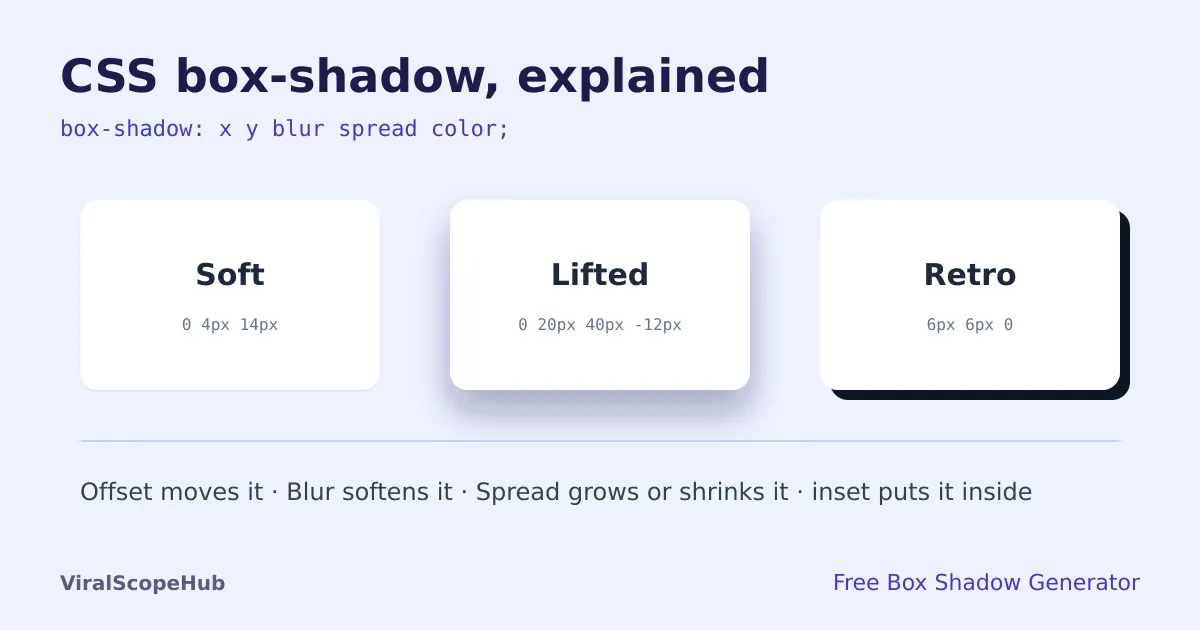
The CSS box-shadow property takes up to five values: a horizontal offset, a vertical offset, a blur radius, a spread radius and a colour, with the optional word inset to put the shadow inside the box. For example, box-shadow: 0 4px 14px rgba(15, 23, 42, 0.08); gives a soft card shadow. The quickest way to get one that looks right is to drag the sliders in our free Box Shadow Generator and copy the CSS. It runs in your browser and shows a live preview.
Shadows are one of the small details that make a web page feel finished. A card that floats a little above the page reads as something you can tap. A button with a soft glow says "press me". Get the shadow wrong, though, and the same card looks dirty or dated: too dark, too sharp, or sitting off to one side like a 2005 clip-art box.
The good news is that box-shadow only has a handful of parts, and once you know what each one does, you can build almost any shadow you see on modern sites.
The box-shadow syntax, value by value
A single shadow looks like this:
box-shadow: [inset] x-offset y-offset [blur] [spread] color;
- Horizontal offset (x). How far the shadow moves to the right. A negative number moves it left. Most realistic shadows use
0here, because light usually comes from above. - Vertical offset (y). How far the shadow moves down. A positive value makes the box look lifted off the page; bigger values make it look higher.
- Blur radius. How soft the edge is.
0gives a hard edge, larger numbers spread the shadow out and fade it. Blur cannot be negative. - Spread radius. Grows the shadow (positive) or shrinks it (negative) before it is blurred. A negative spread is the secret behind many good-looking "lifted" shadows, because it keeps the shadow tucked under the box instead of leaking out the sides.
- Colour. Use a colour with transparency, such as
rgba(0, 0, 0, 0.15). If you leave the colour out, the browser uses the element's text colour. - inset. Draws the shadow inside the box instead of outside, which makes it look pressed in, like an input field or a pushed button.
Only the two offsets are required. If you give three lengths, the third is the blur; four lengths means blur and spread.
Five shadows you can copy
These match the presets in our generator, so you can open it, click one and tweak from there.
- Soft (cards and panels):
box-shadow: 0 4px 14px rgba(15,23,42,.08), 0 1px 3px rgba(15,23,42,.1); - Lifted (featured cards, modals):
box-shadow: 0 20px 40px -12px rgba(30,27,75,.35); - Retro (bold, flat designs):
box-shadow: 6px 6px 0 #111827; - Inset (inputs, pressed buttons):
box-shadow: inset 0 2px 6px rgba(0,0,0,.25); - Glow (focus rings, call-to-action buttons):
box-shadow: 0 0 24px 4px rgba(99,102,241,.6);
Why layered shadows look more real
You can stack several shadows on one element by separating them with commas. The first one in the list is drawn on top. Real objects cast two kinds of shadow at once: a tight, darker one right under the edge where they touch the surface, and a wide, faint one from light scattering around them. Copying that with two layers, one small and sharp, one big and soft, is why the "Soft" example above looks more natural than any single shadow. Our generator lets you add up to five layers and edit each one separately.
Common mistakes
- Pure black at high opacity.
rgba(0,0,0,.5)looks muddy on most backgrounds. Try 5 to 20 percent opacity, or tint the shadow with a dark version of your background colour (dark navy on a blue page, dark brown on a warm one). - Offsetting sideways for no reason. A shadow pushed to the right suggests light from the left. That is fine if the whole page agrees, but mixing directions looks broken.
- Forgetting dark mode. Shadows almost disappear on dark backgrounds. On dark themes, a slightly lighter surface colour or a faint border often works better than a heavier shadow.
- Expecting the shadow to take up space. A box-shadow does not change layout, so a big shadow can be cut off by a parent with
overflow: hidden. Add padding to the parent if the edges get clipped.
box-shadow or filter: drop-shadow?
box-shadow always follows the element's box, including its rounded corners from border-radius. If you want a shadow that follows the actual shape of a transparent PNG or an SVG icon, use filter: drop-shadow(0 4px 8px rgba(0,0,0,.2)) instead. Drop-shadow has no spread value and no inset option, but it traces the visible pixels rather than the rectangle.
Finish the look
A shadow works best with a matching background and readable text. Pair it with a background from our CSS gradient generator, pick colours that belong together with the colour palette generator, and check that text on your cards passes accessibility rules with the contrast checker. Then shrink the final stylesheet with the CSS minifier.
VSH take: Most design trends come and go, but soft, barely-there shadows have stuck around for years because they help people see what is clickable without shouting. If you only remember one tip, make it this: lower the opacity until you can only just see the shadow, then stop. Taking a break from code? Our free games, study tools and exam guides are a click away, and the flights hub can help if a conference trip is coming up.
ViralScopeHub is independent and not affiliated with the W3C, Mozilla or any browser maker mentioned here.
Frequently asked questions
What are the values in CSS box-shadow?
In order: an optional inset keyword, a horizontal offset, a vertical offset, an optional blur radius, an optional spread radius and a colour. Only the two offsets are required.
How do I make a soft, realistic shadow?
Use a zero horizontal offset, a small downward offset, a large blur and a low opacity, and layer two shadows: a small sharp one and a wide faint one, for example 0 4px 14px and 0 1px 3px.
Can I use more than one box-shadow?
Yes. Separate shadows with commas. The first shadow in the list is drawn on top of the others.
What does a negative spread do?
It shrinks the shadow before it is blurred, so the shadow stays tucked under the box. Combined with a big vertical offset and blur, it gives a clean lifted look.
What is the difference between box-shadow and drop-shadow?
box-shadow follows the element's rectangle and rounded corners. filter: drop-shadow follows the visible shape of the content, such as a transparent PNG, but has no spread or inset.
Is the box shadow generator free?
Yes. It is free, needs no sign-up and runs in your browser, so nothing is uploaded.



