How to Convert JSON to CSV (and Back) Without Breaking Your Data
Short answer
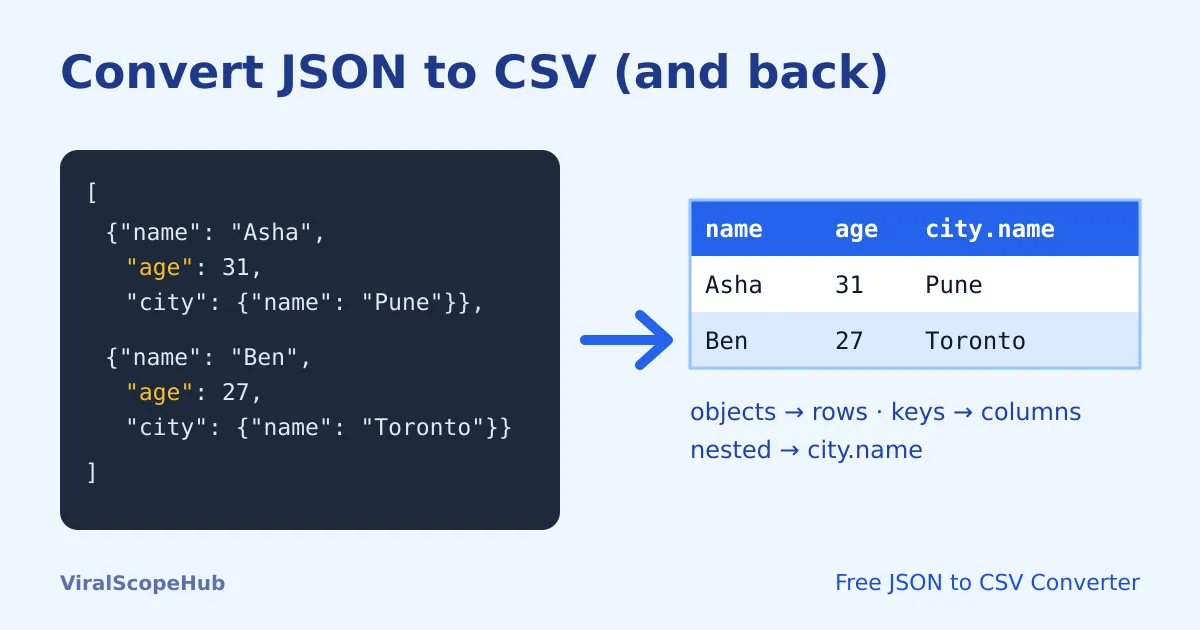
To convert JSON to CSV, you need an array of objects: each object becomes one row, and each key becomes a column header. Nested objects are flattened into column names like address.city, and any value that contains a comma, a double quote or a line break is wrapped in double quotes. Going the other way, CSV to JSON, the first row becomes the keys and every other row becomes an object. Our free JSON to CSV Converter does both directions in your browser, so your data is never uploaded.
JSON and CSV are the two formats you meet most when data moves between apps. APIs, databases and web apps send JSON. Spreadsheets, accounting software, email tools and most "import contacts" screens want CSV. Converting between them is simple once you know what each format can and cannot hold, and where the usual surprises hide.
JSON vs CSV in one minute
| JSON | CSV | |
|---|---|---|
| Shape | Nested: objects inside objects, lists inside lists | Flat: rows and columns, like a spreadsheet |
| Data types | Strings, numbers, true/false, null, arrays, objects | Everything is text; the program reading it guesses types |
| Best for | APIs, config files, app data | Excel, Google Sheets, imports and exports |
| Standard | RFC 8259 | RFC 4180 (a common convention, not a strict law) |
Because CSV is flat and JSON is not, converting JSON to CSV always involves a decision: what happens to the nested parts? Converting back has the opposite problem: CSV does not say which values are numbers and which are text.
How to convert JSON to CSV, step by step
- Open the JSON to CSV Converter.
- Paste your JSON, or drop a
.jsonfile on the page. It is read on your device. - Pick a delimiter if you need one other than a comma (more on semicolons below).
- Press JSON → CSV, then copy the result or press Download.
If the tool reports an error, the JSON itself is probably broken, often a missing comma or a trailing comma. Run it through the JSON formatter first, or read our guide on how to fix invalid JSON.
A worked example
Here are two customer records, with a nested city object and a list of tags:
[
  {"name": "Asha", "age": 31, "city": {"name": "Pune", "country": "India"}, "tags": ["tea", "chess"]},
  {"name": "Ben", "age": 27, "city": {"name": "Toronto", "country": "Canada"}, "note": "Likes \"quotes\", commas"}
]
Our converter turns it into this CSV:
name,age,city.name,city.country,tags,note
Asha,31,Pune,India,"[""tea"",""chess""]",
Ben,27,Toronto,Canada,,"Likes ""quotes"", commas"
Four things happened, and they are the four rules worth remembering:
- Every key becomes a column, even if only one record has it. Only Ben has a
noteand only Asha hastags, so the other cell is simply left empty. Columns appear in the order they are first seen. - Nested objects are flattened with dots.
city.nameandcity.countrybecame their own columns. - Arrays stay in one cell as JSON text. Splitting a list across columns would break as soon as one person had more tags than another, so the list is kept whole.
- Commas, quotes and line breaks are quoted. A cell that contains a comma, a double quote or a line break is wrapped in double quotes, and any double quote inside it is doubled (
""). This is the rule described in RFC 4180, and it is what Excel, Google Sheets and LibreOffice expect.
How to convert CSV to JSON
Paste the CSV into the same tool and press CSV → JSON. By default, three options are switched on, and each one is worth understanding:
- First CSV row is the header. The first row becomes the keys. Untick it if your file has no header, and you get plain arrays instead of objects.
- Detect numbers, true/false and null.
1.50becomes the number1.5, andtruebecomes a real boolean. Untick it to keep every value as text. - Rebuild nested objects from dot.keys. A header like
user.citybecomes{"user": {"city": "..."}}, so a file you flattened earlier comes back in its original shape.
The delimiter is detected automatically from the first line (comma, semicolon, tab or pipe), and quoted fields with commas or line breaks inside are read correctly.
The leading-zero trap
Postal codes, phone numbers and product codes often start with zero: 01234, 0044, 007. If they are turned into numbers, the zeros vanish and the data is quietly wrong. Our converter only treats a value as a number when it looks like a proper number, so 01234 stays the text "01234". The bigger risk is often the spreadsheet: when you double-click a CSV file, Excel may strip those zeros as it opens it. To keep them, import the file through Excel's data import (From Text/CSV) and set that column to Text, or open it in Google Sheets and check the column format.
Commas vs semicolons
In many European countries, the comma is the decimal separator (3,5 instead of 3.5), so Excel set to those regions expects CSV columns separated by semicolons. If your whole CSV lands in column A, choose Semicolon ; as the delimiter and convert again. Tabs are another safe choice when your data is full of commas.
Common problems and quick fixes
| Problem | Likely cause | Fix |
|---|---|---|
| Everything is in one column | Delimiter mismatch | Switch between comma and semicolon |
| Strange characters like é | The file was opened with the wrong text encoding | Import as UTF-8 instead of double-clicking the file |
| Rows split in the wrong place | A line break inside a cell was not quoted | Re-export with proper quoting, or convert again with our tool |
| Duplicate rows | The data was merged from several exports | Clean them with remove duplicate lines |
| "Unexpected token" error | The JSON is not valid | Fix it in the JSON formatter first |
Moving data into a database instead? Our SQL formatter keeps your import queries readable, and the regex tester helps you find and clean messy values before you convert. For more developer basics, read our regex cheat sheet and how to format SQL queries.
VSH take: Most broken spreadsheets are not caused by the conversion itself but by what happens after: a double-click that strips zeros, a semicolon region setting or a file saved in the wrong encoding. Convert, then check three things: the column count, a value with a leading zero and a value with an accent. If all three look right, you are done. Studying databases or computer science? Our study tools and exam guides can help, the free games are there for a break, and if you are heading to a tech conference, compare fares on the flights hub.
ViralScopeHub is independent and not affiliated with Microsoft, Google, The Document Foundation, the IETF or any software maker mentioned here.
Frequently asked questions
How do I convert JSON to CSV for free?
Paste your JSON array into our free JSON to CSV Converter and press JSON → CSV. Copy the result or download it as a .csv file. It runs in your browser, so nothing is uploaded.
What happens to nested JSON when converting to CSV?
Nested objects are flattened into dot-separated column names such as address.city. Arrays are kept in a single cell as JSON text so no data is lost.
How do I convert CSV back to JSON?
Paste the CSV and press CSV → JSON. The first row becomes the keys, numbers and true/false are detected, and dot-separated headers are rebuilt into nested objects. You can untick each option.
Why did my leading zeros disappear?
Zeros vanish when a program treats a code like 01234 as a number. Our converter keeps such values as text, but Excel may strip them when you double-click a CSV. Import the file and set the column to Text instead.
Why does my CSV open in one column in Excel?
Your Excel region probably uses semicolons as the list separator. Convert again with the semicolon delimiter, or use Excel's data import and pick the comma delimiter.
Is my data uploaded anywhere?
No. The converter runs entirely in your browser, and files you open are read on your device.



