How to Resize a Video for Instagram Reels, YouTube Shorts and TikTok (9:16)
Short answer
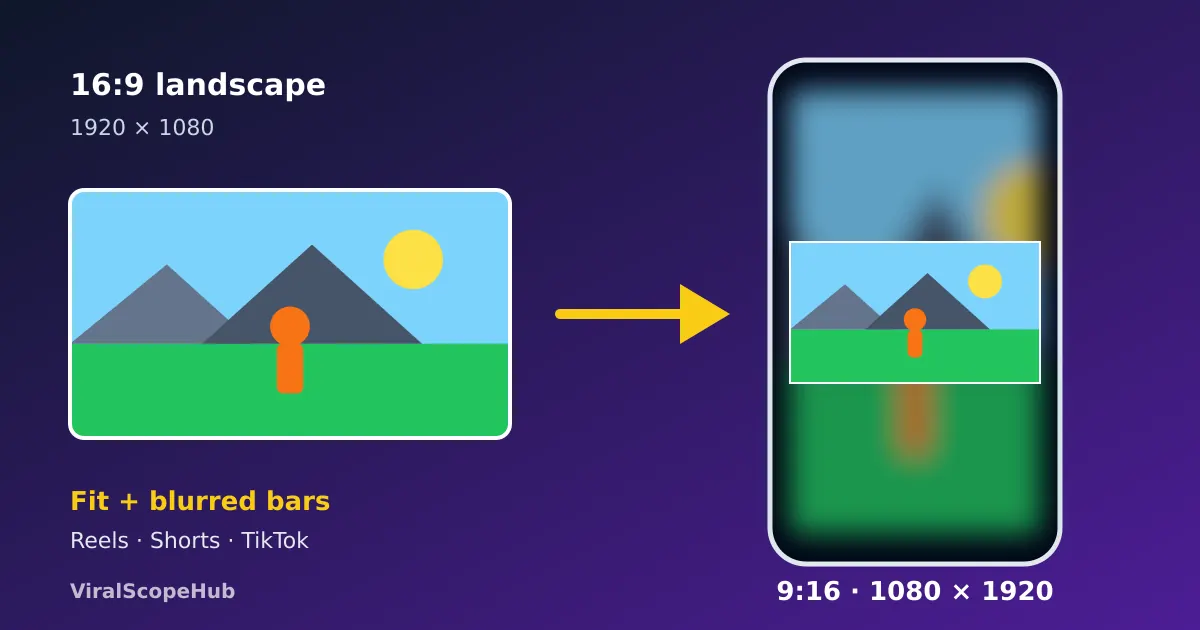
To resize a video for Instagram Reels, YouTube Shorts or TikTok, put it into a vertical 9:16 frame (1080 × 1920 or 720 × 1280 pixels). Use "fit" with blurred bars to keep the whole picture, or "fill" to crop the edges for a full-screen look. Our free Resize Video for Reels tool does both on your own device, with no upload.
You filmed something great, but you held the phone sideways. Or you have a square clip from an old post, or a landscape recording from a laptop. Post it as a Reel or a Short as it is, and the app either shows a thin strip in the middle of a tall black screen or crops off the sides, sometimes cutting a person in half. The fix takes about a minute once you know which option to pick.
Step by step: make any video vertical
- Open the tool. Go to our free Resize Video for Reels, Shorts & TikTok page and choose a video. MP4, MOV (the iPhone default), WebM and MKV all work.
- Pick a size. 9:16 at 720 × 1280 is quick and looks fine on phones. 9:16 at 1080 × 1920 is full HD but takes longer to make. There are also 4:5, 1:1 and 16:9 presets for feed posts and YouTube.
- Choose fit or fill. Fit whole video keeps everything visible and adds bars. Fill the frame zooms in until there are no bars, cutting off the edges.
- Choose the bars. Blurred video (a zoomed, soft copy of your own clip) looks the most natural. Black or white bars are cleaner for screen recordings.
- Resize and download. You get an MP4 at 30 frames per second with your original sound. The work happens in your browser: a free open-source video engine downloads once, and your video is never uploaded to a server.
Is the clip actually sideways, with people lying on their side? Fix that first with Rotate Video, then resize. Only need ten seconds of a long recording? Cut it with the Video Trimmer before you start, which also makes the resize faster.
What the apps actually ask for
Instagram's Help Center says you can upload a reel with an aspect ratio anywhere between 1.91:1 (wide) and 9:16 (tall), and that reels should have at least 30 frames per second and a minimum resolution of 720 pixels. YouTube's Help Center says a Short should be up to 3 minutes long with a square or vertical aspect ratio. TikTok is built around the same full-screen vertical shape. So one vertical 9:16 file usually works for all three, which is why it is the size most creators export.
| Preset | Pixels | Best for |
|---|---|---|
| 9:16 vertical | 1080 × 1920 or 720 × 1280 | Reels, Shorts, TikTok, Stories, WhatsApp Status |
| 4:5 portrait | 1080 × 1350 | Instagram and Facebook feed posts |
| 1:1 square | 1080 × 1080 | A safe shape for most feeds |
| 16:9 landscape | 1280 × 720 | Regular YouTube videos and TVs |
Is 1080 × 1920 worth the wait? It has 2,073,600 pixels per frame, 2.25 times as many as 720 × 1280 (921,600). On a phone screen the difference is small for talking and casual clips, but noticeable for detailed scenery or small text. Apps change their recommendations from time to time, so glance at the upload screen if something looks off.
Blurred bars or crop? The maths decides
Here is what really happens to a normal landscape video (16:9, 1920 × 1080) when it meets a vertical 1080 × 1920 frame:
- Fit with bars: the video shrinks to 1080 pixels wide, so it is only about 608 pixels tall. That fills roughly 32% of the screen height, leaving about 656 pixels of bar above and below. Blurred bars make that space look intentional instead of empty.
- Fill (crop): to cover the frame, only a slice about 608 pixels wide survives from the original 1,920. You keep roughly a third of the picture and lose about two thirds from the sides.
So the rule of thumb is simple. Use fit with blurred bars for group shots, screen recordings, slides, sports and anything with text near the edges. Use fill when one person or object sits in the middle of the frame, such as a close-up, a talking head or a product shot. A square video loses less: fitting 1080 × 1080 into 1080 × 1920 leaves 420-pixel bars at the top and bottom, and a 4:5 clip leaves just 285 pixels each.
Common mistakes to avoid
- Captions in the danger zone. The app's buttons, your username and the description sit over the bottom and right side of a vertical video. Keep important text near the middle; you can add it with Add Text to Video.
- Stretching instead of resizing. Forcing a 16:9 picture into 9:16 without bars or cropping makes everyone look tall and thin. A proper resize never distorts.
- Resizing twice. Every re-encode loses a little quality, so resize from the original file, not from a copy you already downloaded from an app.
- Huge files on slow data. If a long clip takes ages to send, shrink it with Compress Video, and see our video file size guide to estimate the size first.
- Other people's videos. Resize clips you made or have permission to use. Reposting someone else's work can break copyright rules and the platform's terms.
VSH take: one master, many shapes
Our favourite habit is to keep the original landscape video as the "master" and export a fresh copy for each place you post: 9:16 for Reels and Shorts, 4:5 for the feed, 16:9 for YouTube. It takes a minute each and every version looks made for its home. Students can turn a science-fair demo or a class presentation into a Short this way, so plan the shoot around exam dates on our exam calendar and find subject help on our study pages. Heading off on a trip? Film your travel moments in landscape, resize them later, and look for fares on our flight deals hub. To understand the numbers behind every shape, read aspect ratio explained or try the Aspect Ratio Calculator.
Platform specs in this guide come from the Instagram and YouTube help centres as of October 2026 and can change. Pixel figures are our own calculations. ViralScopeHub is not affiliated with Instagram, Meta, YouTube, Google or TikTok.
Frequently asked questions
What size should a video be for Instagram Reels?
A vertical 9:16 video, usually 1080 × 1920 pixels (or 720 × 1280 for a quicker, smaller file). Instagram accepts reels between 1.91:1 and 9:16 and asks for at least 30 frames per second and 720-pixel resolution.
How do I make a landscape video vertical without cropping?
Use "fit" mode with bars. Our Resize Video for Reels tool places the whole video in a 9:16 frame and fills the empty space above and below with a blurred copy of the same clip, or with black or white bars.
Is the same size right for YouTube Shorts and TikTok?
Yes. YouTube says Shorts should be square or vertical and up to 3 minutes long, and TikTok uses the same full-screen vertical shape, so one 9:16 export usually works for both.
Will resizing lower the quality?
Any re-encode loses a little detail, so start from your original file and resize only once. Choosing 1080 × 1920 keeps more detail than 720 × 1280 but takes longer to process.
Is my video uploaded when I use the tool?
No. The resize runs inside your browser with a free open-source engine that downloads once. Your video stays on your device.



